
Pokémon HOME
The Pokémon CompanyTools
3.711.42K Reviews
- Version
- 4.0.3
- Installs
- 10.00M
- Age Rating
- Everyone
Screenshots

Our Review of Pokémon HOME
 Analysis by Appyee
I see Pokémon HOME as a useful companion for keeping a Pokémon collection organized across supported games, rather than a game in its own right. Its real value is continuity: it gives collectors a place to manage their Pokémon and make trades, but it works best when you already play compatible Pokémon titles and are comfortable with the rules around moving creatures between them. If you want a standalone adventure, this isn’t it; if you care about keeping a collection together, it can be worth a closer look.
A collection hub, not another Pokémon adventure
Published by The Pokémon Company, this free Tools app is built around collection management. It has a 3.8 average from around 118,000 ratings and over 10 million installs, so it has clearly found a large audience, though that rating also hints that the experience is not effortless for everyone. It is rated for Everyone, runs on Android 6.0 and later, and its current version is 3.4.3. Optional in-app purchases range from $2.99 to $15.99 per item.
That context matters because the app is most satisfying when I treat it as a practical utility. I wouldn’t open it expecting battles or a new story. I’d use it between play sessions to check what I have, decide what I’m willing to trade, and keep a longer-term collection in view. The cloud-based approach makes that organizing role the central idea, but it doesn’t remove the need to understand which games and transfer routes fit a particular Pokémon.
Your Ultimate Pokémon Storage Solution
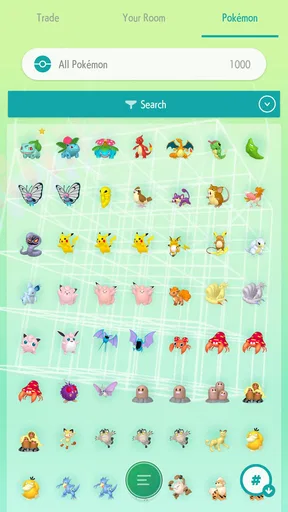
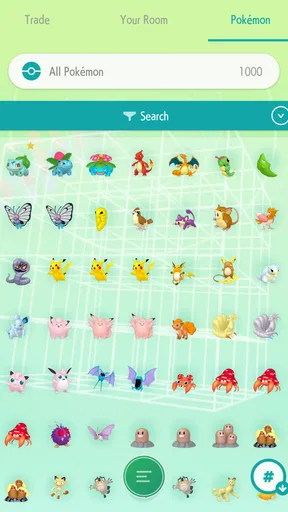
First off, Pokémon HOME is like the ultimate storage box for your Pokémon. Remember when you had to carefully manage which Pokémon to keep and which to send back to the wild? With this app, those days are long gone. You can store up to 6,000 Pokémon, which is just mind-blowing. It’s like having a virtual Pokémon Center right in your pocket.
Cross-Platform Connectivity
One of the coolest features has to be its cross-platform connectivity. You can transfer Pokémon from Pokémon Sword and Shield, Pokémon GO, and even the Let’s Go series. This means you can finally have your favorite Pokémon from different games all in one place. It’s like a family reunion for your Pokémon!
In practical use, I’d plan a transfer before tapping through it. A Pokémon that has sentimental value or a carefully chosen move set is exactly the one I would double-check before moving, especially when my goal is to use it in a particular game later. HOME is a bridge for compatible collections, not a promise that every Pokémon can move freely into every title. I’d check the destination game’s compatibility first and treat one-way or restrictive transfer steps cautiously rather than assuming I can reverse them whenever I like.
A simple routine helps: sort out what you want to keep in its original game, identify what you’re moving, and only then start the transfer. That makes the app more useful for a player who dips into several games over time, while someone who plays just one title and rarely moves Pokémon may find the extra layer unnecessary. I also see a distinction between having a Pokémon safely represented in a collection and having it available to use in a particular game; those are not always the same goal.
Trading Made Easy
Trading has never been this straightforward. With Pokémon HOME, you can trade with friends or even random Trainers around the world. The app offers several trading options like Wonder Box, GTS, Room Trade, and Friend Trade. It’s super fun to see what kind of Pokémon you’ll get in return. Who knows, you might score that elusive shiny you’ve always wanted!
The different routes suit different moods. For a specific search, I’d use the GTS and state what I’m looking for as clearly as possible; for a surprise, Wonder Box is the more hands-off choice. Friend Trade makes more sense when I already know who I’m trading with, while Room Trade is aimed at a shared group exchange. They aren’t interchangeable: a random trade is exciting precisely because I give up control over the result, so I wouldn’t put a rare or personally important Pokémon into that kind of exchange unless I was genuinely happy to part with it.
For everyday use, I might check the GTS while commuting, place a Pokémon I can spare in Wonder Box, then come back later to see what happened. That’s a low-pressure way to make progress on a collection without turning every trade into a negotiation. If I’m searching for one exact Pokémon, patience is part of the process; trading depends on other people’s offers and requests, so the app can’t guarantee a quick match. It’s a useful complement to trading directly in a game, not a way to make every exchange predictable.
Pokédex Enthusiasts Rejoice
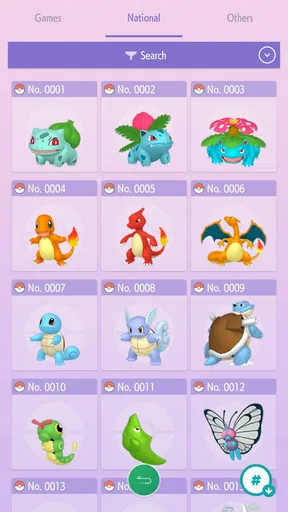
For all the Pokédex completionists out there, this app is a dream come true. Pokémon HOME automatically updates your National Pokédex as you transfer Pokémon. It even gives you neat little facts and trivia about each species. It’s like having a personal Pokémon professor in your pocket, helping you become the ultimate Pokémon Master.
I’d use the Pokédex as a progress check rather than assuming that seeing an entry means every collection goal is finished. It can help me notice gaps and decide what to look for next, which is more actionable than browsing a long list without a plan. A practical approach is to pick a small group of missing entries, then use trades or compatible games to work on those specifically. That keeps completion from becoming a vague, all-or-nothing project.
This is also where the app can appeal to people who enjoy collecting even when they aren’t actively playing a mainline game. Checking entries, reviewing what has arrived, and setting the next target can make a short session feel worthwhile. Still, a digital record is not the same as catching or raising a Pokémon yourself; players who care mainly about the adventure and battles may get little satisfaction from cataloguing alone.
Subscription: Is It Worth It?
Now, let’s talk about the subscription. The Basic Plan is free, which is awesome for casual players. But if you’re really serious about your collection, the Premium Plan is where it’s at. It gives you access to more features, like the ability to move Pokémon from Pokémon Bank and increased storage capacity. For hardcore fans, it’s definitely worth considering.
I’d begin with the free option and see whether I actually run into a limitation that affects my routine. The paid plan makes more sense for someone with a large, active collection or a specific need to bring Pokémon across from Pokémon Bank; it is harder to justify if I only want to check a Pokédex or make occasional trades. Since optional purchases are also offered in the app, I’d look carefully at the current plan details before paying rather than treating a subscription as a requirement for every user.
It’s also worth separating “more room” from “better organization.” Extra capacity can solve a genuine storage problem, but it won’t automatically make a sprawling collection easier to manage. I’d still decide which Pokémon I’m keeping for a team, which I’m holding for a future game, and which I’m comfortable trading away. A little planning can make the free experience go further; paying is most compelling when the added capacity or transfer access solves a real problem for me.
User Interface and Experience
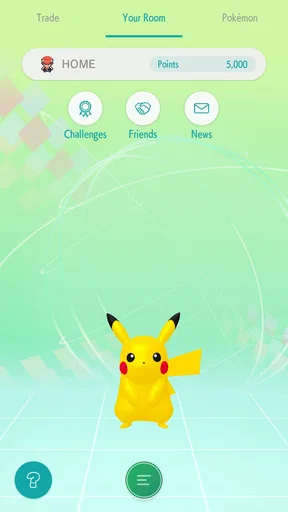
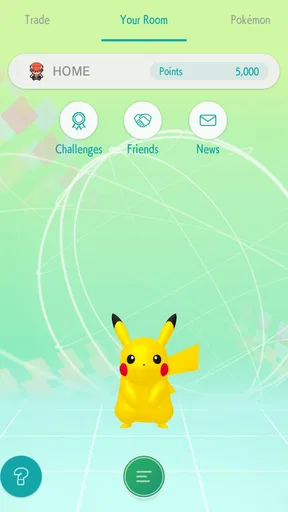
The user interface is clean and easy to navigate. Everything is laid out in a way that makes sense, so you’re not fumbling around trying to find what you need. The app runs smoothly, and I didn’t encounter any bugs or glitches during my time with it. It’s clear that a lot of thought went into making this app user-friendly.
Even with a straightforward layout, managing a collection is a different task from playing a Pokémon game. The useful habit is to make deliberate choices before moving or trading anything, rather than treating every box as temporary clutter. I’d give important Pokémon a mental “do not trade” status and review a proposed exchange before confirming it. That small pause matters more here than fast navigation: the main risk is making a choice I regret, not failing to find a button.
For a crowded collection, I’d also work in focused sessions instead of trying to reorganize everything at once. One session can be for checking entries, another for preparing trades, and another for transfers. That keeps the app from feeling like a chore and makes it easier to remember why a Pokémon is being moved. It is a simple workflow, but it suits a tool whose value comes from careful management rather than constant activity.
Learning Curve
If you’re new to Pokémon or haven’t played in a while, there might be a slight learning curve. But once you get the hang of it, everything becomes second nature. The app includes helpful tutorials to get you up to speed, so you’re not left in the dark.
The trickiest part for a returning player is less about learning the screens and more about understanding the relationship between HOME and the games. I’d first decide what I want the app to do for me: preserve a collection, move eligible Pokémon, find trades, or track Pokédex progress. Then I’d try one low-stakes transfer or trade before moving anything I would hate to lose. That approach makes the first session more informative and reduces the temptation to rush through unfamiliar steps.
Compared with keeping everything inside one game, HOME offers a broader collection view and trading options, but adds another place to check and another set of transfer decisions. Compared with simply trading in a game, it gives more ways to interact with other Trainers, though that variety brings more uncertainty about timing and outcomes. If I only want to play battles and progress through a story, staying in the game is simpler. If I’m maintaining a collection across compatible games, the extra layer earns its keep.
Who Will Get the Most From It
I’d recommend it most to collectors who move between supported Pokémon games, completionists who enjoy tracking entries, and players who want a convenient place to arrange trades. It is also a sensible option for someone returning to the series with Pokémon gathered over time, provided they are willing to check compatibility and think through transfers before acting. The strongest case is not simply “I have lots of Pokémon”; it is “I want to manage them across games and have a reason to revisit my collection.”
On the other hand, a newcomer with no compatible game or collection may find little to do at first. A player who wants a self-contained mobile game should look elsewhere, and someone who dislikes online exchanges may never use one of the app’s most social sides. It is also not ideal for a person who expects every trade to deliver a particular result or every stored Pokémon to be usable in every game. The app rewards a collector’s patience more than a player’s appetite for immediate action.
Final Thoughts
In conclusion, Pokémon HOME is a fantastic tool for any Pokémon enthusiast. It streamlines the process of managing and trading your Pokémon, making it easier than ever to build your dream team. Whether you’re a casual player or a hardcore collector, this app is sure to enhance your Pokémon experience. So, what are you waiting for? Give it a try and take your Pokémon journey to the next level!
My verdict is more specific: I’d install it if I had compatible games and cared about keeping a collection organized, but I wouldn’t call it essential for every Trainer. The best approach is to start with a clear goal, test the workflow with Pokémon I can afford to move, and use the free option until I know which limits matter to me. For the right collector, it turns scattered ownership into something easier to manage; for everyone else, it can remain an extra utility they rarely need.
Verdict
Strengths of Pokémon HOME
- Seamless Pokémon transfer across games.
- User-friendly interface for easy navigation.
- Cloud storage for extensive Pokémon collection.
- Regular updates with new features.
- Compatible with both iOS and Android devices.
Limitations of Pokémon HOME
- Requires a stable internet connection.
- Some features locked behind premium plan.
- Limited free Pokémon storage space.
- Initial setup can be confusing for beginners.
- No offline access to your collection.
Other Releases by The Pokémon Company
View All


Similar Picks in This Category
View All
Google LLC4.0

Gboard - the Google Keyboard
Google LLC4.5

Google Play services
Google LLC4.3

Google Play Store
Google LLC4.9

Files by Google
Google LLC4.5

SHAREit: Transfer, Share Files
Smart Media4U Technology Pte.Ltd.4.3
Frequently Asked Questions
What is Pokémon HOME and how does it work?
Pokémon HOME is a cloud-based service that allows players to store, manage, and transfer Pokémon across different games. Compatible with Pokémon Sword, Shield, Let's Go, and others, it acts as a central hub for your collection. You can also trade Pokémon with other players using the app, making it a versatile tool for trainers.
Is Pokémon HOME free to use, or does it require a subscription?
Pokémon HOME offers both a free plan and a premium subscription. The free plan has limited features such as basic storage and trading options. The premium plan, available for a monthly or annual fee, provides expanded storage, the ability to transfer Pokémon from the Pokémon Bank, and other premium features.
Can I trade Pokémon with other players using Pokémon HOME?
Yes, Pokémon HOME allows you to trade Pokémon with other users worldwide. You can use the Wonder Box for random trades, the GTS for specific trades, Room Trade to host or join trading rooms, and Friend Trade to exchange with friends. These features make trading more accessible and engaging.
What devices are compatible with Pokémon HOME?
Pokémon HOME is available on Nintendo Switch and mobile devices, both Android and iOS. The Switch version focuses on transferring Pokémon between games, while the mobile version offers additional features like trading and event notifications. Syncing your account across devices ensures seamless access to your Pokémon collection.
How secure is my Pokémon collection in Pokémon HOME?
Pokémon HOME uses secure cloud storage to ensure your Pokémon collection is protected. Regular updates and a robust security framework help safeguard your data. However, users are advised to use strong passwords and enable two-factor authentication to enhance their account security further.
